
Sage Intacct has built-in functionality to recognize revenue, but not expenses. A customer of ours needed a way to easily recognize revenue as well as expenses on project by project bases. Revenue side can be handled by Intacct, although the process isn’t super straight-forward. On the expense side, there is nothing in Intacct that can be used, so a custom process needed to be created.
After reviewing the client’s accounting workflow, we settled on the following approach. All revenue is initially posted to a Customer Deposits account and all expenses are initially posted to Prepaid Project Cost account. The actual revenue and expense accounts are specified in custom fields on the item level. When a project is completed, the user runs a custom program that checks for all journal entries for completed projects and moves the balances to the revenue and expense accounts specified in the item. Here is how the screen looks:
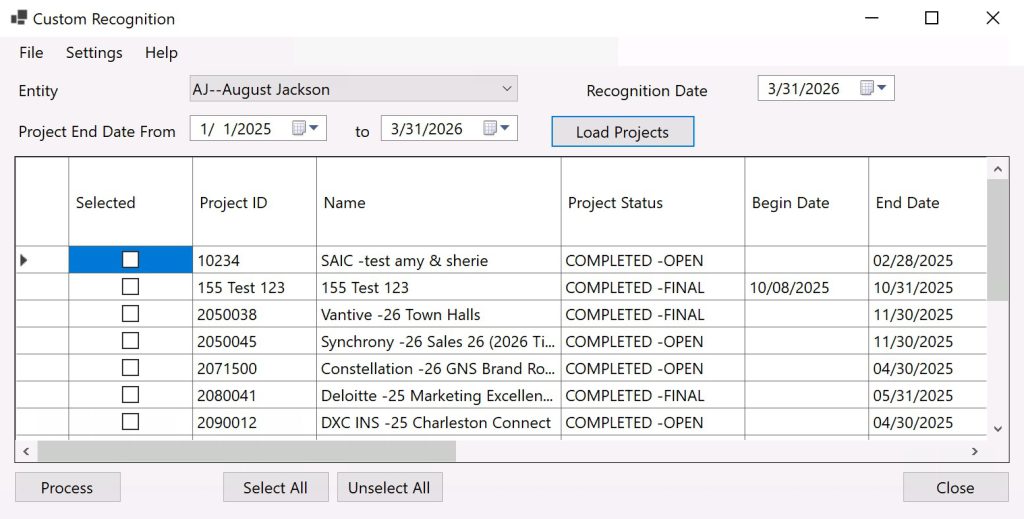
User can select a date range by project end date and the application lists all matching projects. User can select individual projects to recognize the revenue and expense, click a button, and the recognition entries are created in a dedicated journal. The application remembers what was the last journal entry recognized per project, so if additional journal entries are created, they can be recognized at a later time without causing duplicates.
This process proved to be so convenient that the customer decided to forgo Intacct’s revenue recognition functionality and use this process for both revenue and expense recognition.