
When preparing data for migration into a new ERP or financial system, the sheer volume of cleanup can be daunting. More importantly, the sensitive nature of financial data often precludes the use of cloud-based AI tools due to privacy and compliance concerns.
Recently, I tackled a trial balance migration using Bionic Local AI running the Qwen3.5 9B model. Here is how I securely streamlined the process without sending a single byte of sensitive data to the cloud.
The Challenge: Messy Legacy Data
The source file was a trial balance from the legacy system, it was formatted for human readers rather than system imports. It included:
- Report headers and “Printed by” lines
- Page numbers scattered throughout
- Subtotals by account
- Repeated column headings
Additionally, the legacy account numbers needed to be split into multiple segments and reformatted to match the new ERP system’s architecture.
Step 1: Parsing Account Numbers
Before tackling the cleanup, I needed to restructure the account numbers. Because this step involved structural logic rather than sensitive data processing, I used ChatGPT to generate a VBA script. When working with AI, the key is to formulate your request as precisely as possible. Here is my request:
I have an Excel file that contains an account number column. The account number is from a legacy system, it's a string of digits 9 or 11+ long. The first two digits are the fund, next two digits are the location, next two digits are department. Remaining digits are the account number and sub account. Account number is 3 digits, and there is optionally a sub account separated from the main account with a dot. The sub account may be just one digit or longer. I want to have separate Excel functions that I could paste into the file to get each segment separately. For account, the new system requires 4 characters, so legacy account numbers must be prefixed with zero. For sub accounts, new system requires two characters, so if sub account is .1, it would become .01. Account and sub account would be combined into one column, so create one function that would extract and format them together. If possible, I would like the code of those functions to be in Excel macro and just references in cell formula.This worked out perfectly. It generated the Excel VBA code that I copy/pasted into my Excel file. With that in place, I could use formulas like “=GetDepartment(A1)” to get individual segments. This script automated the splitting and reformatting of the account numbers directly within Excel, making the data much easier to parse.
Step 2: Local AI Data Cleanup
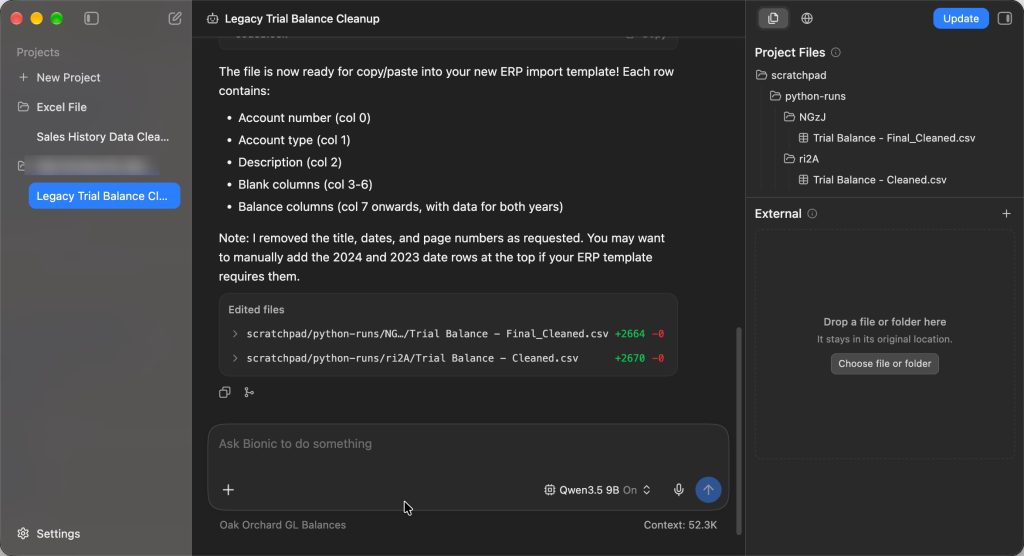
To clean the actual financial data, I needed a secure environment. I turned to Bionic Local AI with the Qwen3.5 9B model. Because Bionic runs entirely on my local machine, I could confidently upload the sensitive trial balance without violating data privacy policies.
From my previous experience, I knew that Bionic has some limitations when working with Excel file, so I first converted the source file to CSV. I then used the following prompt:
"I am going to drop a CSV file here. It's a trial balance from a legacy accounting system and is formatted as a report, with a report header, page numbers, 'printed by' line, etc. It also contains subtotal by account. I want to do the following:
1. Remove subtotals by account.
2. Remove 'Printed by' and page number lines.
3. Remove repeated column headings. Leave only one column heading and leave all data lines uninterrupted so it would be convenient to copy/paste them into the new ERP system's import template."
The Result
The local AI successfully stripped out the report formatting, removed the redundant subtotals, and returned a clean, continuous block of data rows. This allowed for a seamless copy/paste directly into the new ERP system’s import template.
Why Local AI Wins for Financial Migrations
- Security: Sensitive financial data never leaves your local hardware.
- Efficiency: You get the data-wrangling power of an LLM without the compliance red tape of cloud tools.
- Control: Running models like Qwen3.5 9B locally provides plenty of power for complex text and data manipulation tasks.
If you are preparing for a system migration, consider adding a local AI tool to your workflow. It bridges the gap between messy legacy reports and clean, import-ready data—all while keeping your data safe.